感谢GitHub,在我想到解决方案后,发现GitHub已经有人把代码实现了。参考源码:https://github.com/mike-zhang/pyExamples/blob/master/socketRelate/tcpServer1_multithread.py
注:本文附有演示示例。
场景:Python socket通信客户端与服务端的网络质量不好,会导致客户端断线。那么就需要实现一个自动重连的机制。
解决方案:
其实很简单,当断线检测到之后,我们每隔固定时间向服务端继续创建socket连接即可,一旦成功,即可使用连接成功的文件描述符(socket fd)
服务端代码:
#! /usr/bin/env python
#-*- coding:utf-8 -*-
# version : Python 2.7.13

import socket
import threading

class ThreadedServer(object):
    def __init__(self, host, port):
        self.host = host
        self.port = port
        self.sock = socket.socket(socket.AF_INET, socket.SOCK_STREAM)
        self.sock.setsockopt(socket.SOL_SOCKET, socket.SO_REUSEADDR, 1)
        self.sock.bind((self.host, self.port))

    def listen(self):
        self.sock.listen(5)
        while True:
            client, address = self.sock.accept()
            client.settimeout(60)
            threading.Thread(target = self.listenToClient,args = (client,address)).start()

    def listenToClient(self, client, address):
        size = 1024
        while True:
            try:
                data = client.recv(size)
                if data:
                    response = data
                    client.send(response)
                    print "secndLen: ",len(data)
                else:
                    raise error('Client disconnected')
            except:
                client.close()
                return False

if __name__ == "__main__":
    while True:
        port_num = 8888
        try:
            port_num = int(port_num)
            break
        except ValueError:
            pass

    ThreadedServer('127.0.0.1',port_num).listen()
客户端代码:
#! /usr/bin/env python
#-*- coding:utf-8 -*-
# version : Python 2.7.13

import os,sys,time
import socket

def doConnect(host,port):
    sock = socket.socket(socket.AF_INET, socket.SOCK_STREAM)
    try :
        sock.connect((host,port))
    except :
        pass
    return sock

def main():
    host,port = "127.0.0.1",8888
    print host,port
    sockLocal = doConnect(host,port)

    while True :
        try :
            msg = str(time.time())
            sockLocal.send(msg)
            print "send msg ok : ",msg
            print "recv data :",sockLocal.recv(1024)
        except socket.error :
            print "\r\nsocket error,do reconnect "
            time.sleep(3)
            sockLocal = doConnect(host,port)
        except :
            print '\r\nother error occur '
            time.sleep(3)
        time.sleep(1)

if __name__ == "__main__" :
    main()
注意看,客户端代码,我们重点是通过doConnect()函数进行重新获取socket文件描述符,一旦成功,直接给到 sockLocal 变量即可。
演示示例:
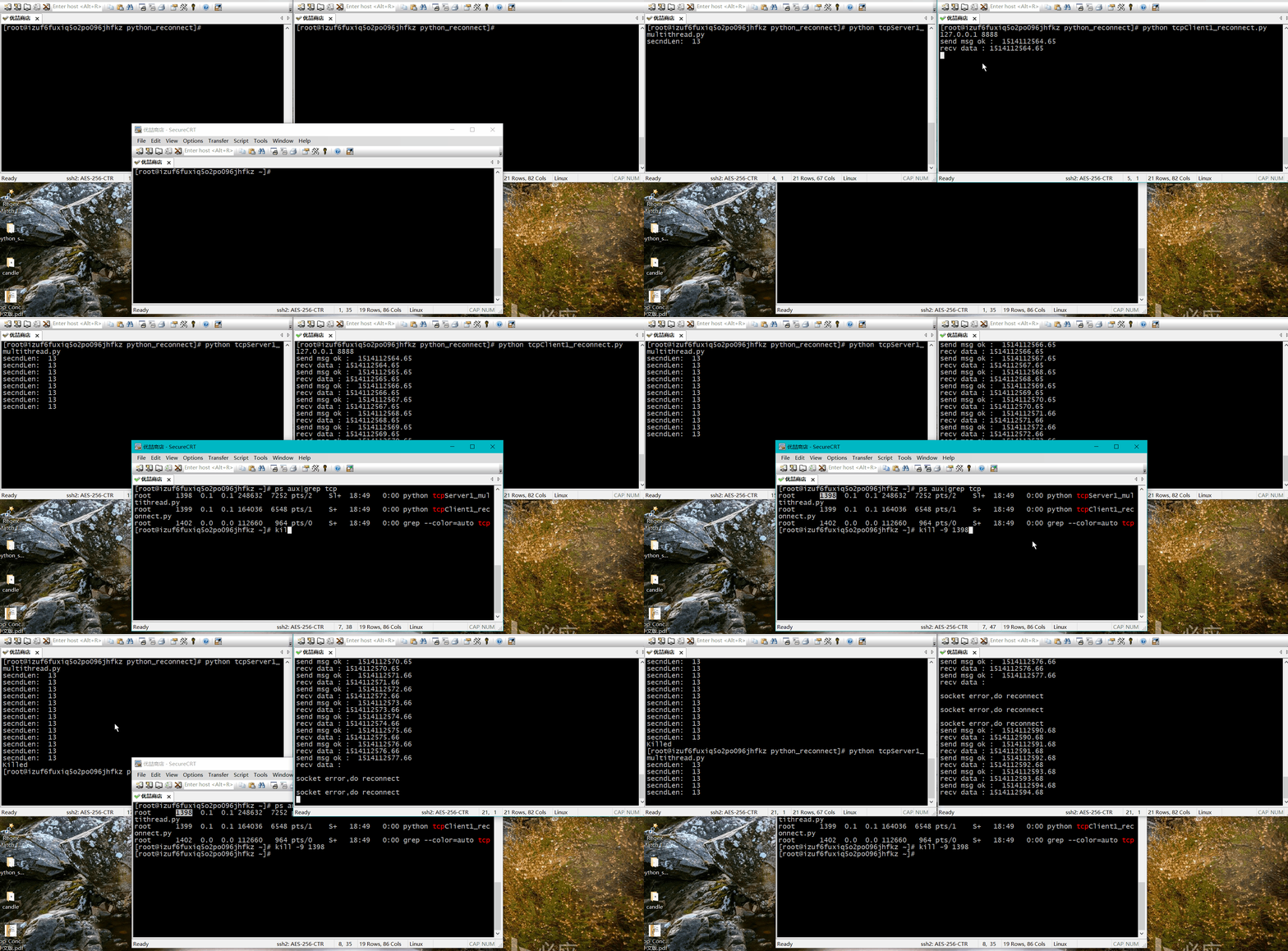
我们通过杀死服务端进程,然后查看客户端的现象,然后再重新启动服务端,检查客户端是否可以重连上。
文章的脚注信息由WordPress的wp-posturl插件自动生成

 微信扫一扫,打赏作者吧~
![[整理]how to run flask with pyqt5](http://www.jyguagua.com/wp-content/themes/begin/timthumb.php?src=http://www.jyguagua.com/wp-content/uploads/2021/03/pyqt_flask.png&w=280&h=210&zc=1)
![[已解决]LINK : fatal error LNK1158: cannot run 'rc.exe' 错误的解决办法](http://www.jyguagua.com/wp-content/themes/begin/timthumb.php?src=http://www.jyguagua.com/wp-content/uploads/2021/02/Snipaste_2021-02-17_15-18-26-1024x505.png&w=280&h=210&zc=1)
![[已解决]Python扩展模块 error: Unable to find vcvarsall.bat](http://www.jyguagua.com/wp-content/themes/begin/timthumb.php?src=http://www.jyguagua.com/wp-content/uploads/2020/11/Snipaste_2020-11-19_10-01-38.png&w=280&h=210&zc=1)
![[整理]PyQt画圆,动态变色](http://www.jyguagua.com/wp-content/themes/begin/timthumb.php?src=http://www.jyguagua.com/wp-content/uploads/2020/08/drawCircle.gif&w=280&h=210&zc=1)
